![Neon Logo- high Res-23.png]](https://support.neonscreens.com/hs-fs/hubfs/Neon%20Logo-%20high%20Res-23.png?height=50&name=Neon%20Logo-%20high%20Res-23.png)
I. How to Fix a "There Are No Active Publications" message on your screen.
If your Neon screen displays a message like "There Are No Active Publications", it means that either that your Neon Dashboard has no content published to your screen, or that the Neon Device is not connected to the internet.
Follow these steps to get your content back on screen:
1. Connect your Device to Wi-Fi
Follow the instructions in this article to identify connection status and get your device back online. If you have content published, this will allow your device to retrieve it.
Note: You can also validate whether your device is online by logging into your Dashboard at admin.neonscreens.com. Click the Screens tab to view the status of each of your screens.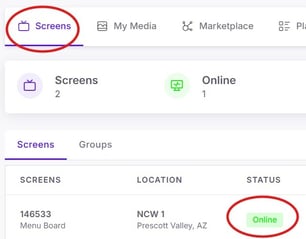
2. Download Your Content
Once your device is connected to the internet, you can download and display your published content. If fetching/download does not automatically begin:
Open the Menu/Settings within the Neon app on the screen by pressing the "OK" button or large round center button on Amazon signage devices.
Look for the option labeled "Refresh Content" in the upper right of the screen to manually prompt a download for the most updated content assigned to this screen from your Neon Dashboard.
3. Publish Content to Your Screens
If you have ensured the device is connected to the internet and still see the "There Are No Active Publications" Message, it is because no content is currently published to this screen and available for download.
Learn more about how to create, adjust, schedule, and publish your content HERE.